Welcora features

Features for running every stay through one rental readiness platform.

Welcora connects the listing playbook with the operational loop, so short-term rental operators can manage guest experience, smart devices, field work, and readiness from one shared context.

Build the listing playbook once.

Set up standards, guidebooks, guest requirements, staff rules, task templates, smart device rules, offers, alerts, and reservation context for each listing or operation.

  • Guidebooks and guest requirements
  • Task templates and staffing rules
  • Smart device access and comfort settings
  • Offers, alerts, branding, and permissions
Run each stay through the operational loop.

Each booking moves through guest pre-check, stay support including smart devices, checkout, turnover, inspections, and follow-up until the listing is ready for the next guest.

  • Guest pre-check
  • Stay support and smart devices
  • Checkout handoff
  • Turnover, inspections, and follow-up

Three product surfaces, one shared operating context.

Welcora keeps operations, field work, and the guest experience aligned around the same property playbook, reservation details, smart devices, and task context.

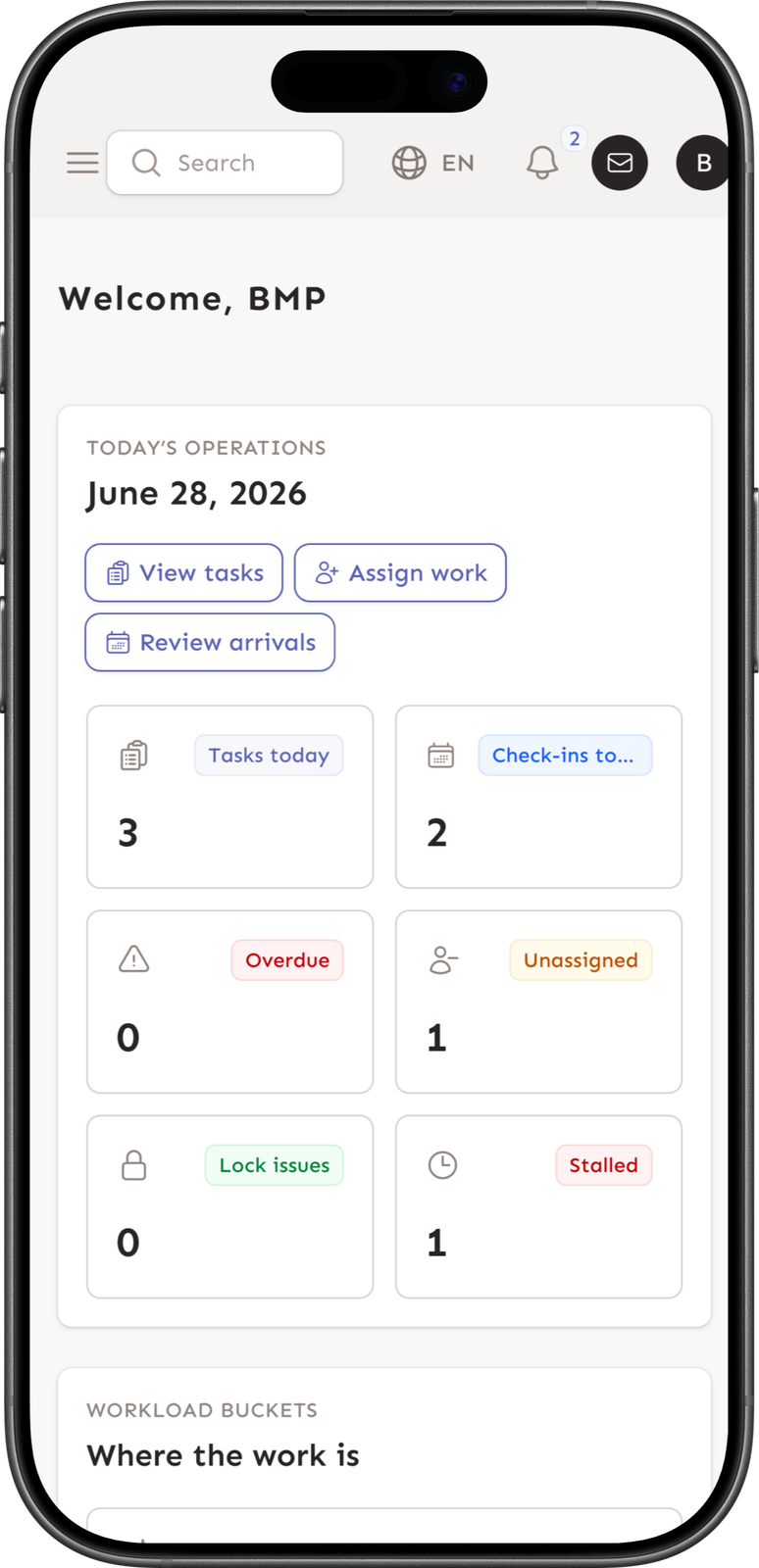
Operations Command

Build the property playbook, connect reservations and smart devices, and keep every stay moving from one control center.

Welcora primary app dashboard on iOS

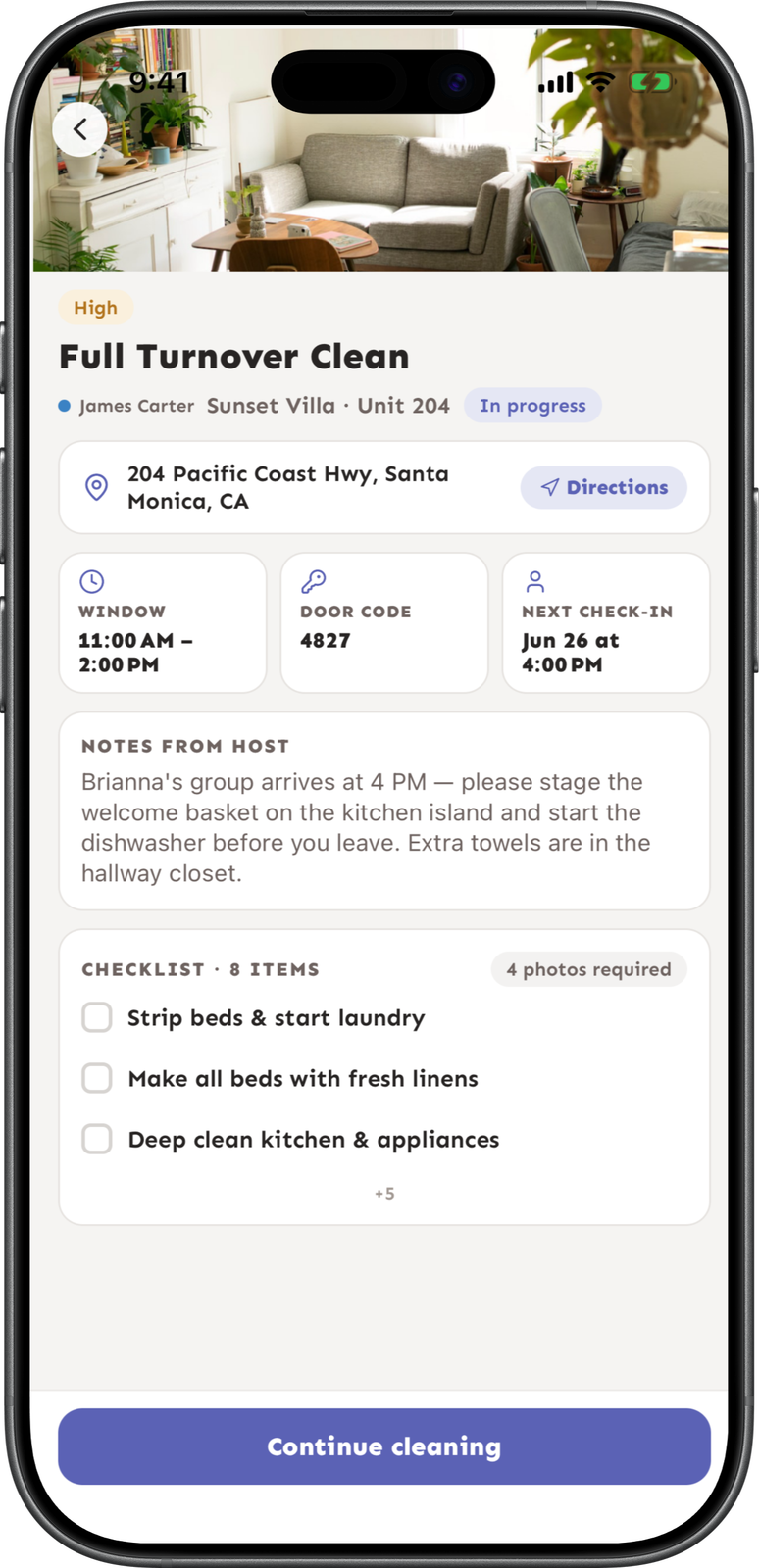
Field Execution

Give cleaners and maintenance teams the exact work, timing, access, notes, and proof requirements for each stay.

Welcora staff app clean overview on iOS

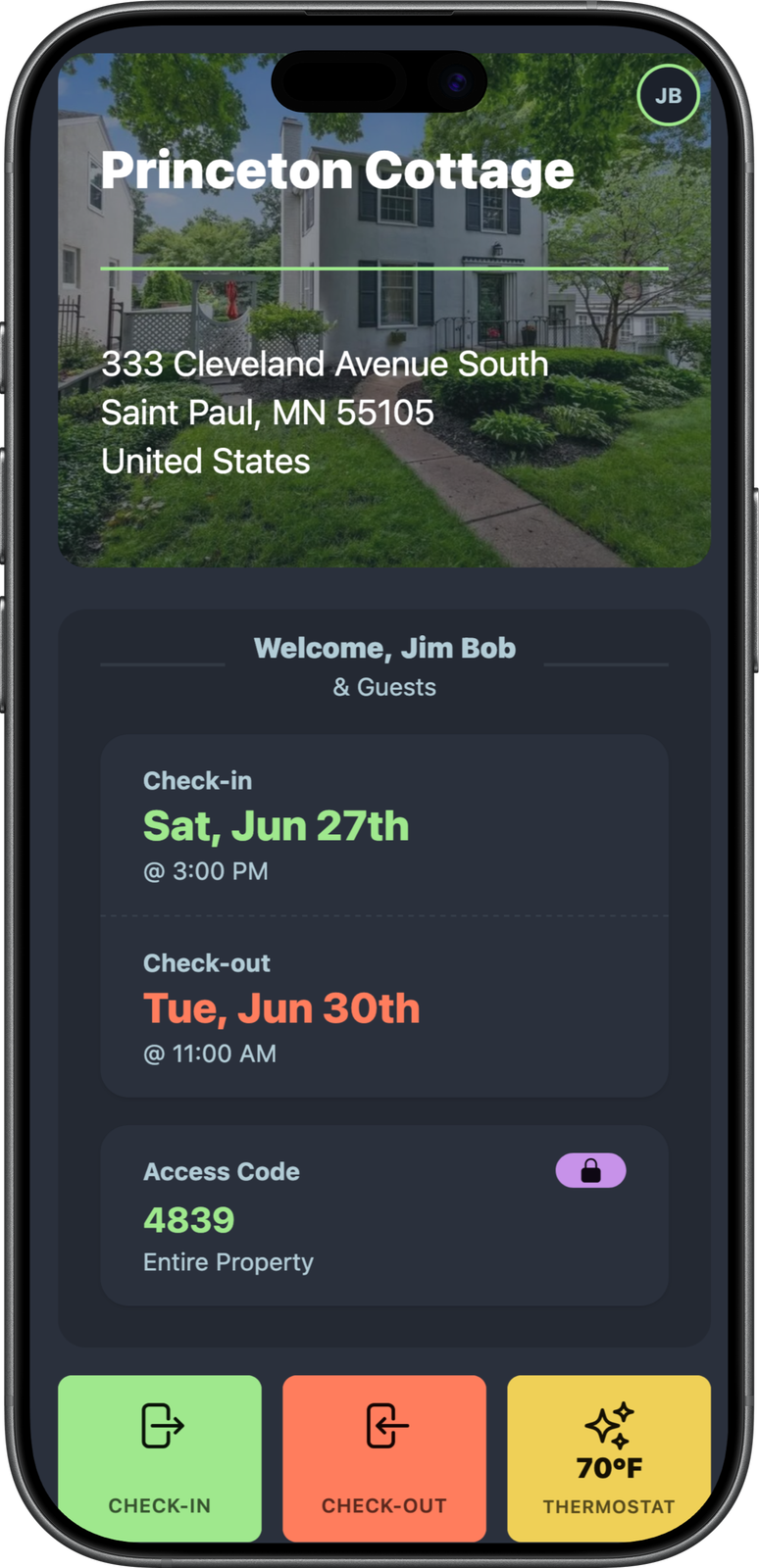
Guest Experience

Guide each guest from pre-arrival to checkout with the right instructions, requirements, smart device context, and stay details.

Welcora guest guidebook on iOS

Explore the feature areas that make each stay ready for the next guest.

Each page explains where the capability fits, how operators use it, and how it connects to the rest of the operational loop.

Digital guidebooks

Guest-ready guidebooks for every listing.

Build branded guidebooks with arrival details, house instructions, local recommendations, AI answers, QR codes, and reservation-aware stay context.

Explore feature

Guest pre-checks

Pre-arrival requirements in one flow.

Use configurable pre-check steps to collect guest details, house-rule acceptance, waivers, signatures, ID review, and evidence logs inside the guest flow.

Explore feature

Guest services

Services and payments inside the stay.

Present early check-in, late checkout, custom services, Stripe-backed payments, Viator experiences, and guest messages inside the guidebook experience.

Explore feature

Reservations and PMS

Reservation context that drives readiness.

Connect PMS listings and reservations, support manual reservations where needed, and let reservation changes drive the guest and operational context for each stay.

Explore feature

Smart devices

Smart devices in the operational loop.

Coordinate smart locks, access codes, thermostats, noise sensors, staff access, status checks, and alerts from the readiness workflow your team already uses.

Explore feature

Turnover operations

Turnovers with work, proof, and follow-up.

Build task templates, trigger reservation and recurring workflows, coordinate cleaner pools, collect photo evidence, run inspections, and keep maintenance follow-up connected.

Explore feature

Staff app

Focused work queues for field teams.

Welcora's staff app gives field teams a focused mobile workspace for assigned tasks, claim offers, checklists, notes, photos, timing, and listing access.

Explore feature

Operations dashboard

Daily triage for readiness risk.

Use one daily triage view for tasks due today, arrivals, overdue work, staffing gaps, missing access, smart device issues, messages, intakes, and orders.

Explore feature

Admin and permissions

Roles and settings for growing teams.

Invite users and staff, assign roles and granular permissions, switch workspaces, configure branding and notifications, manage billing, and create API tokens.

Explore feature

Clear task assignments

Clear ownership for every listing task.

Assign cleaning, inspection, and maintenance work through fixed assignees, property staffing rules, ordered cleaner pools, or an intentionally unassigned queue.

Explore feature

Photo proof

Photo proof tied to the work.

Add reference images and required photo steps to task checklists, then review completion and issue photos with the listing, reservation, worker, and timestamps attached.

Explore feature

Issue visibility

One visible record for every listing issue.

Connect staff reports, guest messages, smart device warnings, photos, urgency, ownership, and follow-up work so problems do not get lost between teams.

Explore feature

Listing standards

Property-specific standards that repeat.

Build reusable task templates with instructions, ordered checklists, sub-items, reference photos, proof requirements, priorities, staffing, and schedules for each property.

Explore feature

Cleaner and vendor access

Scoped work and access for field teams.

Use a focused staff app, passwordless sign-in, role-limited work queues, and permanent, date-bounded, or task-specific smart lock access for cleaners and vendors.

Explore feature

Inspections and maintenance follow-up

Inspections that lead to visible follow-up.

Create inspection workflows, capture checklist evidence and issues, then turn findings into assigned maintenance work without losing the original property and reservation context.

Explore feature

Smart lock access

Smart lock access tied to each stay.

Connect supported smart locks, manage reservation access codes, give field teams scoped entry, and keep lock status visible alongside arrival and task readiness.

Explore feature

Thermostats for comfort

Reservation-aware thermostat comfort.

Connect supported thermostats, define seasonal comfort and vacant settings, give guests controlled adjustments, and reconcile device state around check-in and checkout.

Explore feature

Noise sensors for awareness

Noise awareness connected to the stay.

Connect supported noise sensors, attach them to properties, configure monitored thresholds, and notify operators when a noise event needs attention.

Explore feature

Smart device status and alerts

Smart device status in daily triage.

Bring lock connectivity, battery, door state, access-code readiness, thermostat state, noise events, and integration errors into the same operator view as the stay.

Explore feature

More smart devices through Seam

More smart device brands through Seam.

Use Welcora's Seam-powered integrations to connect supported smart locks, thermostats, and noise sensors while keeping device behavior inside the property and reservation workflow.

Explore feature

Waivers and required fields

Required guest details and waivers in one flow.

Configure guest fields, rules acceptance, waivers, acknowledgements, signatures, and supporting evidence as required or optional pre-check steps.

Explore feature

Upsells and tours

Guest upsells and tours in the guidebook.

Create early check-in, late checkout, pool heat, firewood, and custom offers, add Viator experiences, collect Stripe payments, and manage fulfillment from the stay context.

Explore feature

AI guest answers

AI answers grounded in the guest's stay.

Use guidebook content, reservation dates, property instructions, recommendations, contacts, available services, and supported smart device context to answer common guest questions.

Explore feature

Arrival instructions

Reservation-aware arrival instructions.

Bring directions, parking, check-in timing, smart lock access, contacts, Wi-Fi, protected sections, and pre-arrival requirements into one guidebook experience.

Explore feature

Rental readiness your team can run on every stay.

Start a 14-day free trial with no credit card required, or book a demo and we will walk through your playbook and operational loop.